The Simplest Mac
Screen Recorder Ever
One-time purchase, lifetime access. Built for solo creators, educators, and indie devs who hate subscriptions.
🔥 Special Launch Price
Recording Made Ridiculously Simple
Open App
Launch with one click. No complex setup needed.
Select Source
Choose full screen or specific window instantly.
Start Recording
Hit record and create.
That's it!
Features That Creators Love
Auto Zoom & Smart Follow
Let your viewers focus on what matters. With Auto Zoom, the recorder intelligently zooms into where your cursor or clicks happen — creating smooth transitions that make tutorials look effortless and professional.
- ✓ Automatic zoom after each click
- ✓ Smart follow cursor motion
- ✓ Smooth, cinematic transitions
Mouse Tracking with Effects
Make your tutorials crystal clear with intelligent mouse tracking. Add beautiful trails and click highlights that help viewers follow every action effortlessly.
- ✓ Smooth mouse trails
- ✓ Click animations
- ✓ Enable / Disable effects anytime
Custom Cursors
Swap the standard mouse pointer for a polished, custom cursor. Pick the style that fits your recording and give your tutorials a clean, branded look that stands out.
- ✓ Choose from a range of cursor designs
- ✓ Crisp, high-resolution rendering
- ✓ Switch cursors anytime
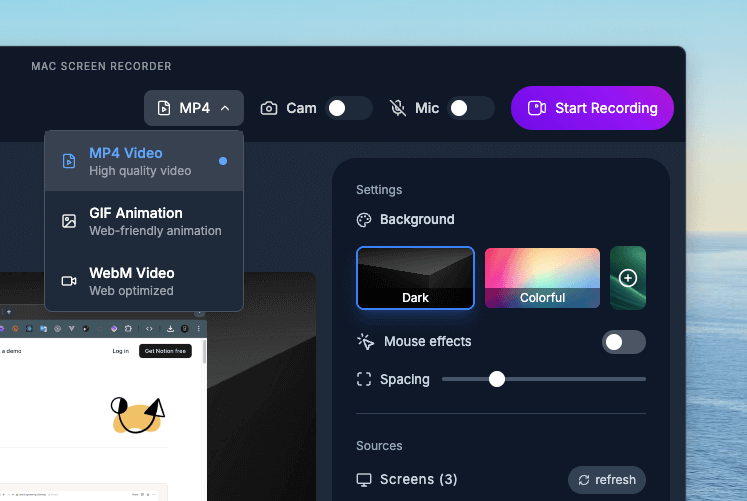
Export to Any Format
Share your recordings anywhere. Export to MP4 for maximum compatibility, WebM for web optimization, or GIF for quick demos and social media.
Stay Focused with Smart Minimize
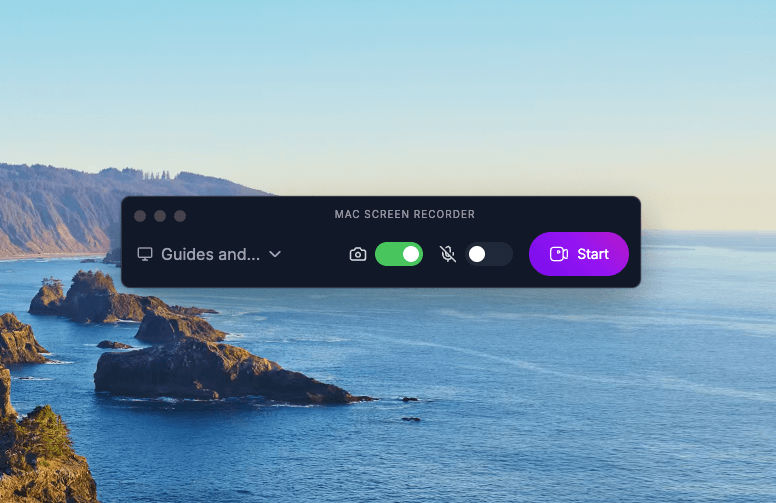
Keep recording without the clutter. Our intelligent minimize feature shrinks the recorder to a tiny floating indicator, giving you full access to your screen while maintaining complete control.
- ✓ One-click minimize while recording
- ✓ Floating control bubble
- ✓ Instant access to pause / stop
Webcam Support
Add your face to tutorials with picture-in-picture webcam recording.
Crystal Clear Audio
Record system microphone
with perfect sync.
Smart Selection
Record full screen or specific windows with intelligent detection.
Minimal UI
Clean interface that stays out of your way while recording.
Built for How You Work
One recorder, tailored to your workflow. See how it fits yours.
For Content Creators
Polished YouTube, social clips & GIFs — no editor needed.
Learn more →For Developers
Crystal-clear bug repros, PR walkthroughs & async demos.
Learn more →For Teachers
Rewatchable lessons & tutorials your students will love.
Learn more →For Designers
Prototype walkthroughs, design feedback & usability tests.
Learn more →For Marketing & Sales
Personalized video, demos & onboarding that get replies.
Learn more →Get It Now Before Price Increases
These premium features are coming soon - included free for early adopters!
Audio Transcript
Automatically generate accurate text transcripts from your audio recordings.
AI Subtitles
Generate accurate subtitles automatically with AI for your recording export.
Auto Animations
Bring your recordings to life with automatic animations applied to your clips for a polished, dynamic feel.
Loved by Creators

"Debugging and documenting workflows is so much faster now. I record a quick video, highlight the issue, and share it with the team instantly."

"Recording tutorials has never been easier. Clean visuals, mouse tracking, and no learning curve, it’s perfect for my lessons."

"It’s my go-to tool for feature walkthroughs. Saves time during handovers and stakeholder updates. The simplicity is what makes it powerful."

"Helps me showcase interactive designs with zero friction. The clean UI and mouse highlights make feedback sessions so much smoother."

"Perfect for recording demo flows or bug repros. Our devs and testers love the clarity, no need for long emails anymore."

"The export options are top-notch. Whether I'm sharing code flows or onboarding demos, it just works with no lag, no mess."

"I use it for everything like client walkthroughs, bug reports, even app store preview videos. Lightweight and reliable."

"Makes user testing documentation effortless. Participants stay focused, and I get clean, shareable insights without clutter."

"Love the quick GIF exports. Ideal for showing off features on my socials without needing to edit anything."

"This tool just fits into our workflow. Every team — from QA to Marketing — benefits from fast, clean screen recordings."

"Creating support videos used to be painful. Now it takes minutes and the results look great, even in GIF form."

"Mac Screen Recorder must be the best recorder I have ever used, I use it daily for my content and explainers, love it!"
Frequently Asked Questions
Ready to Create Amazing Content?
Join creators who've ditched expensive subscriptions
for a tool that just works.
🔒 Secure • 💳 Lemon Squeezy, Multi Payments Accepted